Overview:
Submission Date Control lets users with e-Invoice configuration access to submit documents to LHDNM MyInvois portal based on the settings configured upon document date.
Users are allowed to configure the submission status of an e-invoice document based on the following options available:
Current Date Time
Transaction’s Document Date
Let’s dive into the scenarios and how to apply the submission options accordingly!
Scenario:
You want to prevent users from submitting invoices with Document Dates that are:
more than N days earlier than the current date (too far back-dated), or
later than the current date (future dates).
Example: Current date = 1 Oct 2025. You want to allow backdating up to 3 days only (so earliest allowed Document Date = 28 Sep 2025). Any Document Date on or before 27 Sep 2025 should be blocked from e-invoice submission.
Solution:
Note: These steps assume you are already in your company’s N3 AI Accounting (formerly QNE AI Cloud Accounting) environment and on the e-Invoice admin pages. This procedure omits login/dashboard steps and focuses only on the relevant e-Invoice controls.
Access N3 AI Accounting. At the Navigation Pane, go to e-Invoice and click e-Invoice Settings. Then, click General.
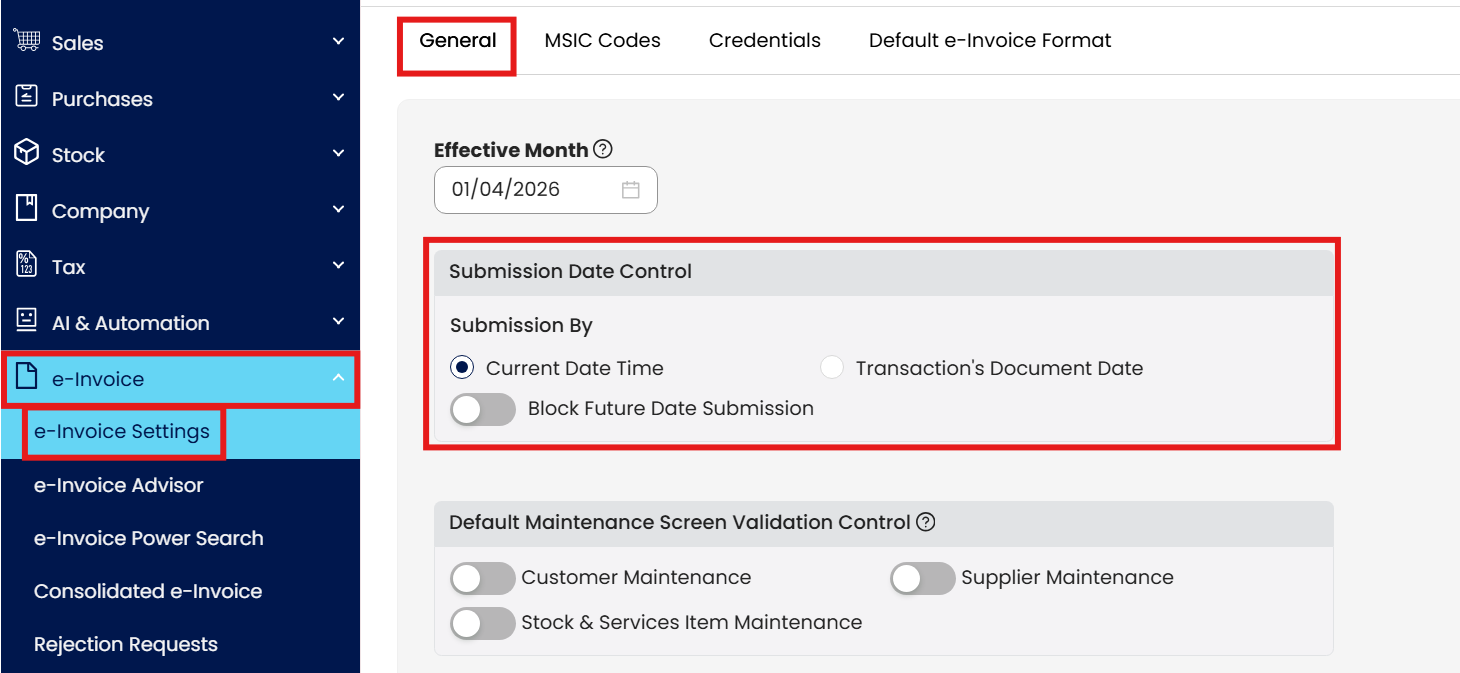
Configure your settings accordingly.
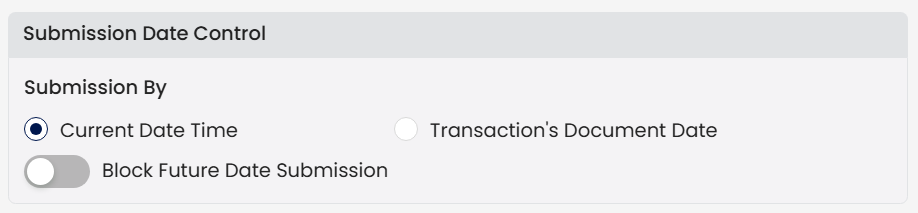
“Submission By Current Date Time”
When a user submits an e-Invoice to LHDN MyInvois, the system will always use the actual current date and time of the submission — not the date shown on the invoice (Document Date).
In other words:
Document Date = the date printed on the invoice
Submission Date & Time = the real date/time when the user clicks Submit e-Invoice
When this control is active, QNE will force the submission timestamp to match the system’s real-time clock, ensuring that all e-Invoices are submitted with an accurate, non-editable submission timestamp.
Example Scenario:
Current date/time: 24 April 2026, 08:35 AM
Document Date: 1 April 2026, 12:00 PM
Upon submission for e-invoice validation submission, here is the result:
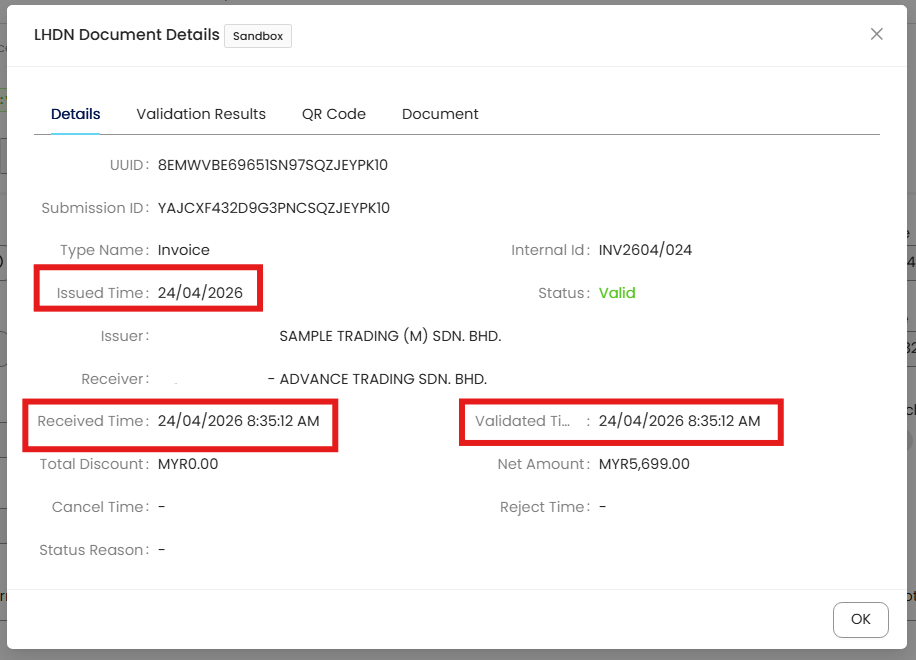
Diagram 1.1 shows the validation result from N3 AI Accounting
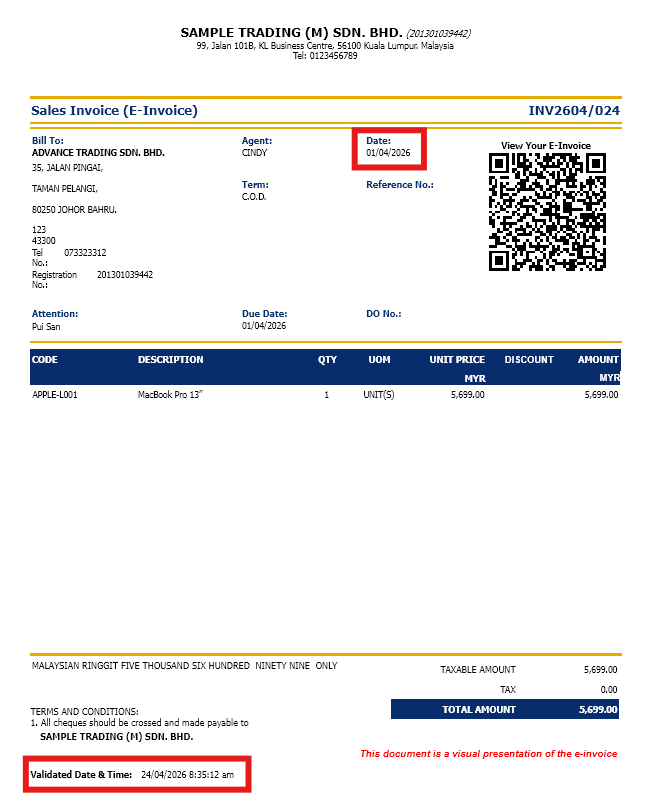
Diagram 1.2 shows the validation result from report preview of a validated Sales Invoice in N3 AI Accounting
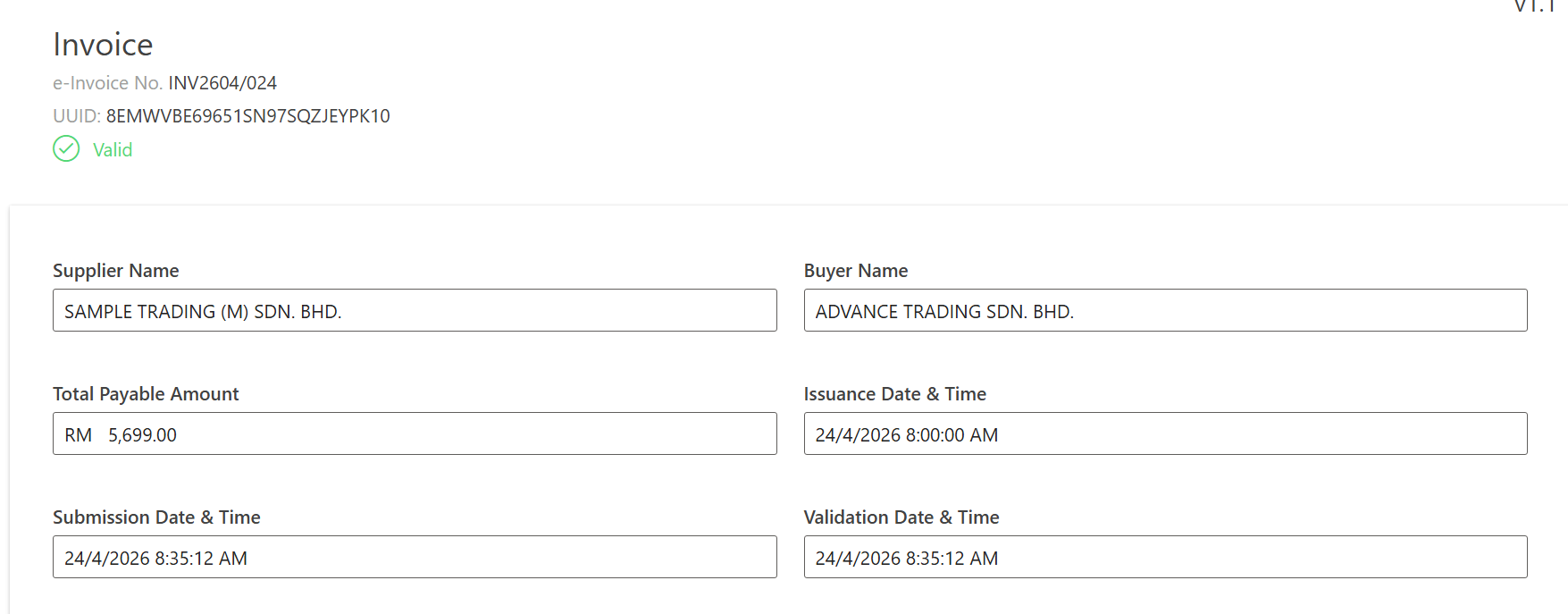
Diagram 1.3 shows the validation result from LHDNM MyInvois portal summary of a validated e-Invoice.
Explanation:
The document was created on 1st of November 2025, but in the LHDNM record, the document is validated based on the current date and time of submission.
Block Future Date Submission
This system setting prevents users from submitting e-Invoices with a Document Date that is later than the current system date/time.
In other words:
The Document Date (invoice date) cannot be in the future relative to the Current Date/Time (submission timestamp).
If a user tries to submit an invoice with a future date while this setting is enabled, the system will block the submission and display a warning message.
NOTE: This function is only available when your Submission setting is set to Current Date Time
Example Scenario:
Current date/time: 24 April 2026, 8:42 AM
Document Date: 25 April 2026, 12:00 PM
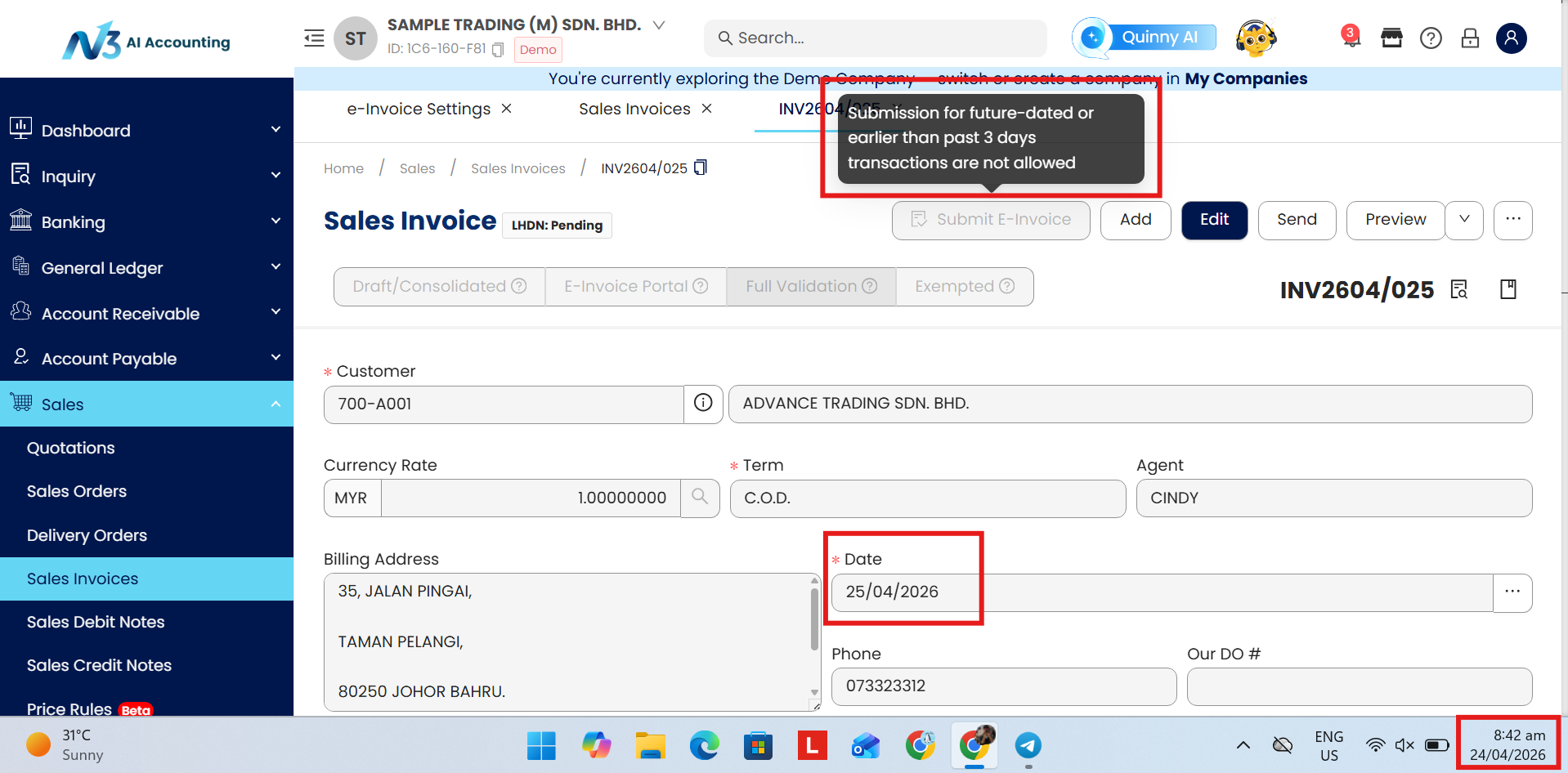
Diagram 2.1 shows the document being blocked from submitting e-Invoice
The system will block the “Submit E-Invoice” button from being able to click, with an error prompts “Submission for future-dated or earlier than past 3 days transactions are not allowed”.
Users can only submit the document on the date of the document.
Submission By Transaction’s Document Date”
The transaction’s document date is the date stated on the invoice, receipt, or financial document, representing the actual date of the transaction. This is different from the Submission Date & Time, which refers to when the e-Invoice is submitted to MyInvois.
When using N3 AI Accounting with this setting, the Block Future Date is automatically applied. The Document Date determines the valid submission window for an e-Invoice. An e-Invoice may be submitted from up to 3 days before the Document Date, following the same submission window enforced by the MyInvois portal.
Note:
Submissions for transactions dated more than 3 days before the submission date are not allowed.
Submissions for future-dated transactions are also not allowed.
Example Scenario
Document Date (Invoice Date): 10 March 2025
This date represents when the transaction occurred.
✅ The allowed submission window
Aligning with MyInvois portal allowed submission window, N3 AI Accounting allows submission up to 3 days backdated, the valid window is: 7 Mar 2025 → 10 Mar 2025.
FAQs
FAQ 1: What is Submission Date Control?
Submission Date Control determines how and when an e-Invoice can be submitted to the LHDNM MyInvois portal, based on the configuration selected in e-Invoice Settings.
It controls whether the system validates submissions using:
the current system date & time, or
the transaction’s document date (invoice date)
FAQ 2: What submission options are available?
N3 AI Accounting provides two submission modes:
Submission by Current Date Time
Submission by Transaction’s Document Date
Each option applies different validation logic for backdated and future-dated invoices.
FAQ 3: What does Submission by Current Date Time mean?
When this option is selected:
The system uses the actual current date & time at the moment of submission.
The Document Date printed on the invoice does not affect the submission timestamp.
The submission timestamp is system-generated and non-editable.
In short:
The invoice may be dated earlier, but MyInvois records the real submission time.
FAQ 4: Under Submission by Current Date Time, can users submit backdated invoices?
Yes — within allowed limits.
Example:
Current date/time: 17 Nov 2025, 12:17 PM
Document Date: 1 Nov 2025
Submission is allowed.
MyInvois records the validation date as 17 Nov 2025, not 1 Nov 2025.
FAQ 5: What is Block Future Date Submission?
This setting prevents users from submitting e-Invoices where:
Document Date is later than the current system date/time
FAQ 6: What does Submission by Transaction’s Document Date mean?
When this option is selected:
The Document Date (invoice date) controls the valid submission window
The submission must fall within MyInvois-approved limits
Future-dated submissions are automatically blocked
NOTE: This setting mirrors MyInvois portal rules exactly.
FAQ 7: What is the allowed submission window under Transaction’s Document Date?
An e-Invoice can be submitted:
Up to 3 days before the Document Date
No later than the Document Date itself
FAQ 8: Can you give a simple example of the allowed window?
Example:
Document Date: 10 March 2025
✅ Allowed submission dates: 7 March 2025 - 10 March 2025
FAQ 9 What is the difference between Document Date and Submission Date & Time?
Document Date: The date of the transaction (e.g. invoice issue date)
Submission Date & Time: The date & time when the invoice is submitted to MyInvois system.
FAQ 10: Which setting should I use?
Use Submission by Current Date Time if you are not able to submit an invoice the same day it was issued in the N3 AI Accounting.
Use Submission by Transaction’s Document Date if you want behavior aligned exactly with MyInvois rules and you want to avoid accidental submission of future-dated invoices.
System Scope: QNE AI Cloud Accounting / N3 AI Accounting
Was this article helpful?
That’s Great!
Thank you for your feedback
Sorry! We couldn't be helpful
Thank you for your feedback
Feedback sent
We appreciate your effort and will try to fix the article
