Overview:
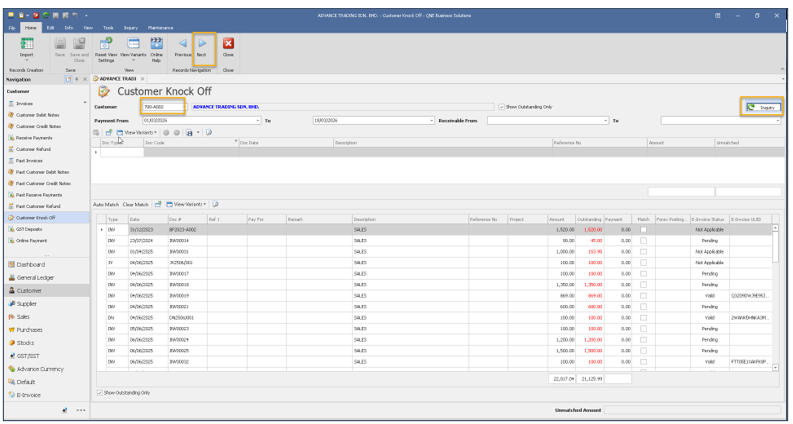
In the current design, under Customer Knockoff, after selecting a customer and setting the payment date, users are required to manually click the “Inquiry” button to load and display the transaction data.
When navigating to another customer using the “Next” button, the system updates the customer information; however, users are still required to click “Inquiry” again to refresh and display the data.
Scenario:
Users would like the system to automatically display the relevant transaction data once a customer is selected, without the need to click the “Inquiry” button manually.
Similarly, when navigating to the next customer r using the “Next” button, the system should automatically load and display the corresponding data for the selected customer.
This enhancement aims to improve efficiency and reduce repetitive actions during customer knockoff processing.
Solution:
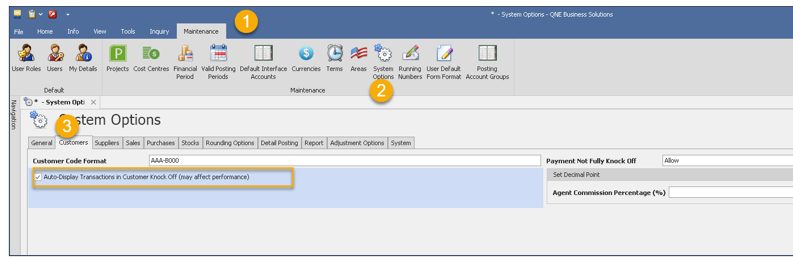
1. Navigate to Maintenance > System Options > Customer. Tick the option “Auto-Display transactions in Customer Knockoff (May affect Performance)”
2. Customer Knockoff> Notice that the filtering and “Inquiry” is no longer display on screen. With such design, the system will display data directly.
However, as there is no filtering user may encounter slow performance if the database size huge or the transactions heavy 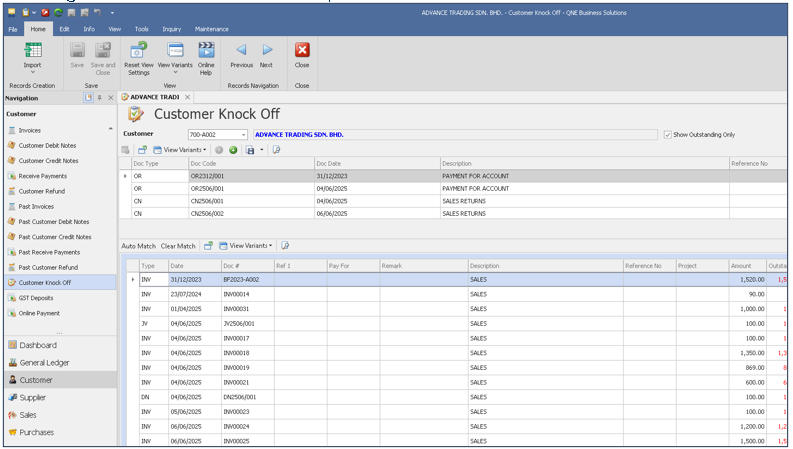
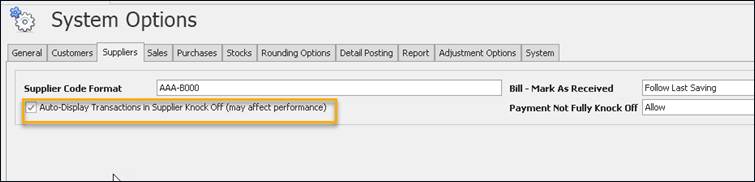
3. To have the same result for Supplier, navigate to Maintenance > System Option > Supplier
Was this article helpful?
That’s Great!
Thank you for your feedback
Sorry! We couldn't be helpful
Thank you for your feedback
Feedback sent
We appreciate your effort and will try to fix the article
