Overview:
The Park and Post feature allows users to temporarily save ("Park") transaction entries as drafts for review or approval before final posting. This helps streamline accounting workflows, prevent posting errors, and maintain internal review controls
Scenario:
In an organization with multi-tier transaction processing, junior accountants or entry clerks may need to draft transactions without posting them immediately to the General Ledger. Conversely, if your team prefers direct transaction posting without a temporary draft stage, you can turn off this feature
Solution:
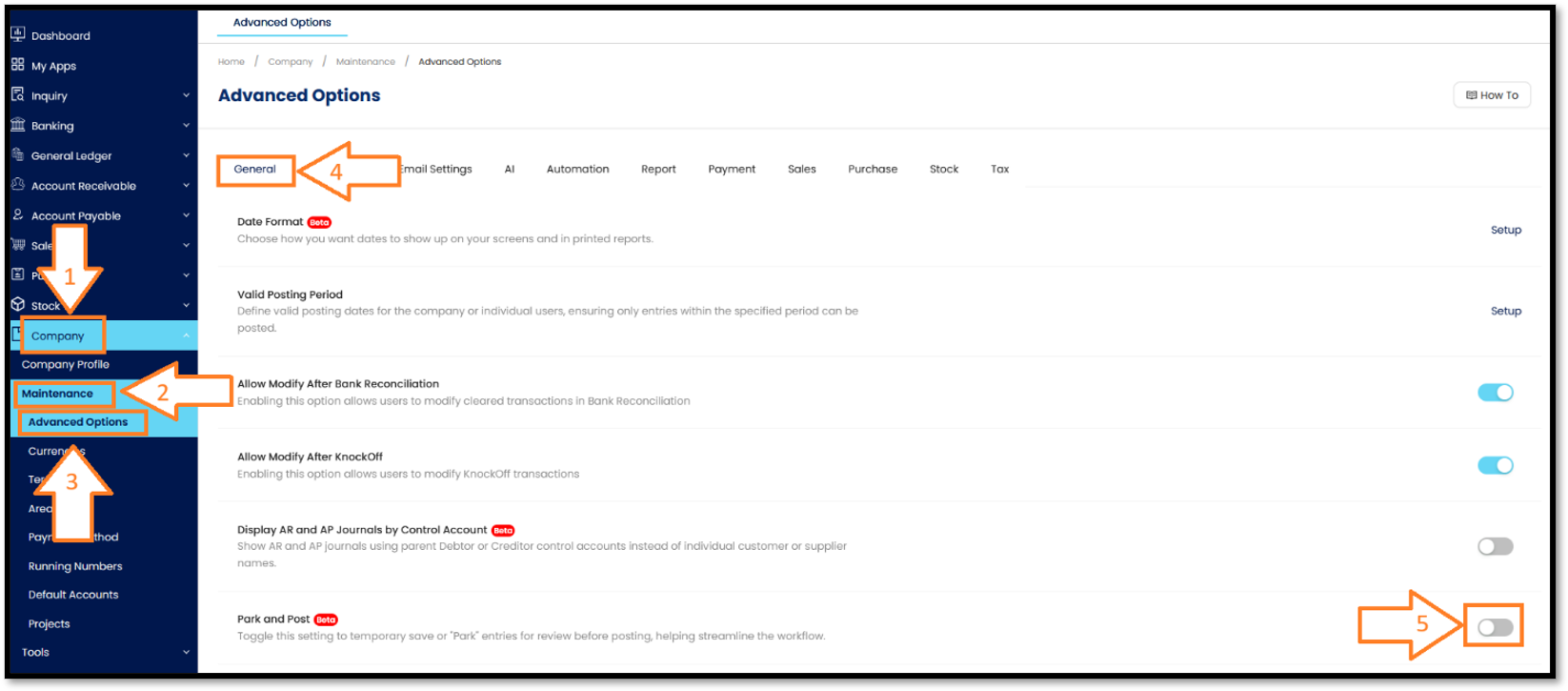
Follow these steps to enable or disable the Park and Post feature:
- On the main navigation sidebar, click on Company > Select Maintenance > Click on Advanced Options > Go to General tab > Scroll down to find the Park and Post option > Toggle the switch:
- Checked / Enabled (ON): Turns on the ability to park entries for review before final posting.
- Unchecked / Disabled (OFF): Disables the temporary save function, forcing direct posting.
Was this article helpful?
That’s Great!
Thank you for your feedback
Sorry! We couldn't be helpful
Thank you for your feedback
Feedback sent
We appreciate your effort and will try to fix the article
