Overview:
The Default Maintenance Screen Validation Control in N3 AI Accounting (formerly QNE AI Cloud Accounting) allows administrators to define whether validation is enforced when maintaining Customer, Supplier, and Stock & Services Item records that are relevant for e-Invoice compliance.
This setting is configured under the General tab of e-Invoice Settings and helps ensure that critical e-Invoice-related information is captured early—before invoices are created or submitted—thereby reducing submission errors and rework.
Scenario:
Your organization is preparing for consistent e-Invoice submissions, but the finance team notices that some customer, supplier, or item records are missing mandatory e-Invoice details (such as identification numbers or tax-related information). These issues are only discovered later during invoice submission, causing delays.
To prevent this, you want the system to validate master data at the maintenance stage, ensuring required e-Invoice fields are completed upfront.
Procedure:
Note: This guide focuses only on the relevant configuration steps and assumes you already have access to the settings area.
At the Navigation Pane, go to the e-Invoice module, then select e-Invoice Settings. Select the General tab.
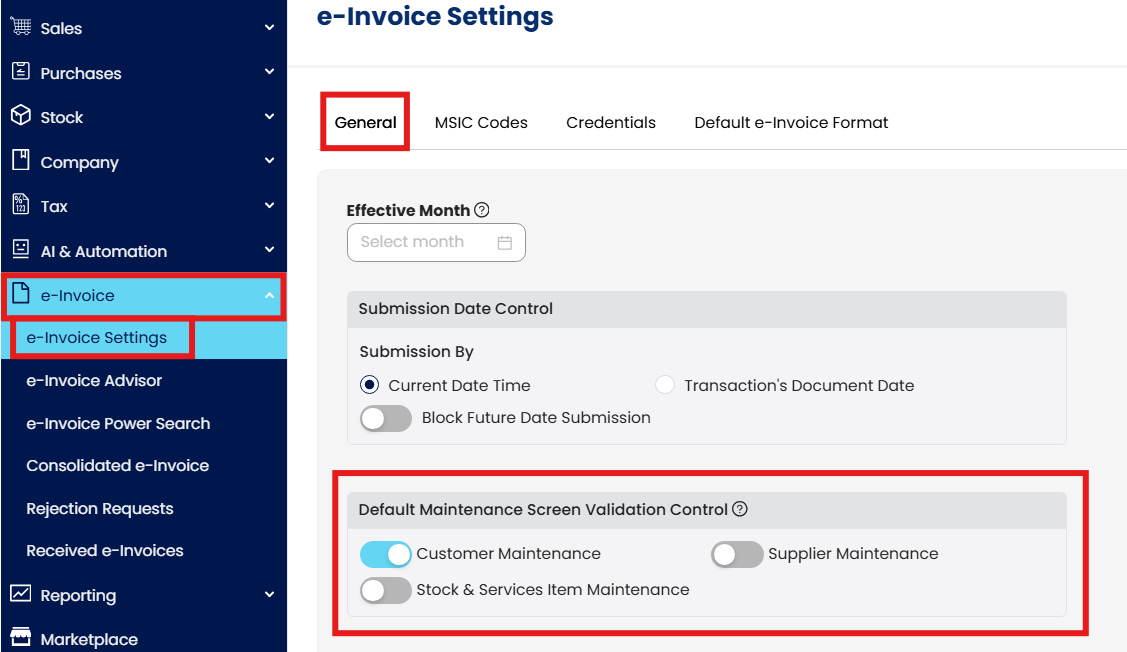
Enable validation for the relevant maintenance screens by toggling one or more of the following options:
Customer Maintenance - Ensures required fields such as Customer name, TIN and related e-Invoice data are completed and validated.

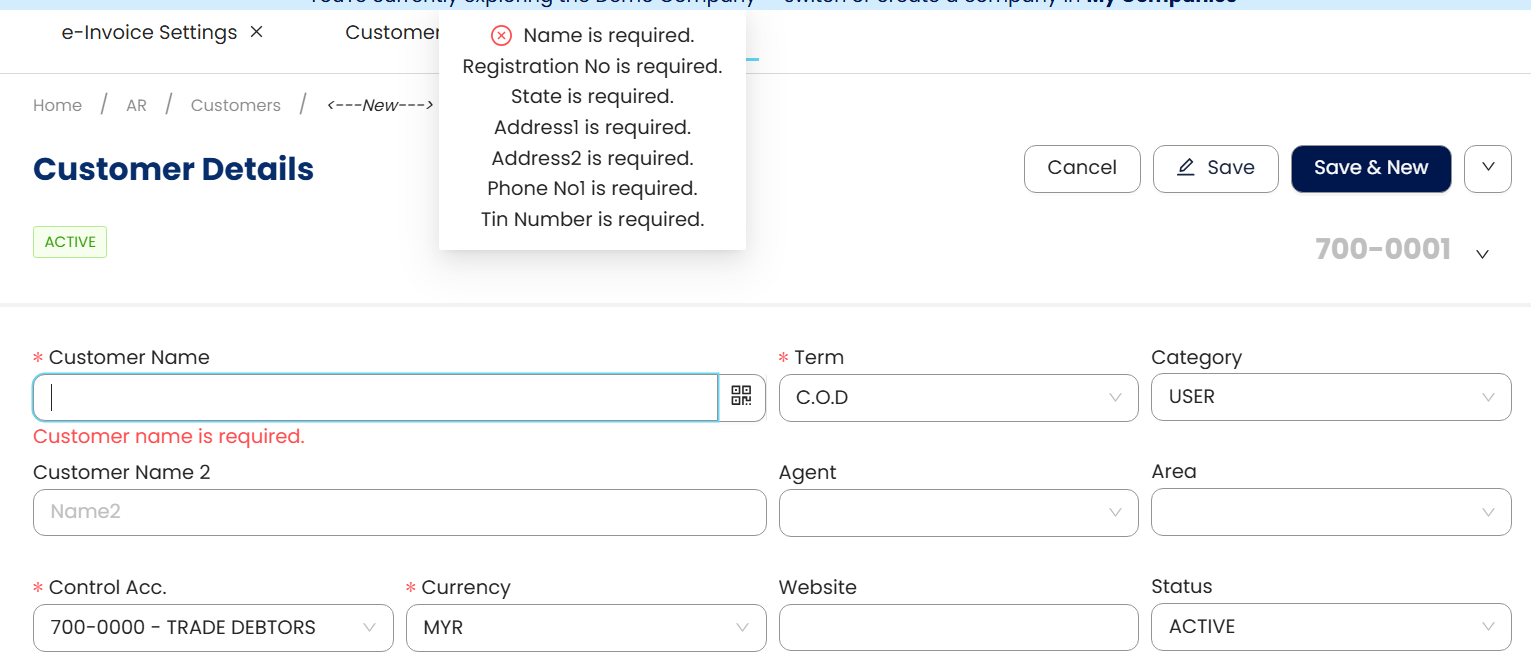
Diagram 2.a. shows the error prompt when you’re trying to create a new customer in your database. The system will prevent you from saving the customer creation if all relevant fields are yet to be filled in.
Supplier Maintenance - Ensures required supplier fields (such as business details, TIN, MSIC codes) meet standards. (NOTE: Supplier Maintenance validation is applicable only for self-billed suppliers. This function does not take effect for non-self-billed suppliers.)

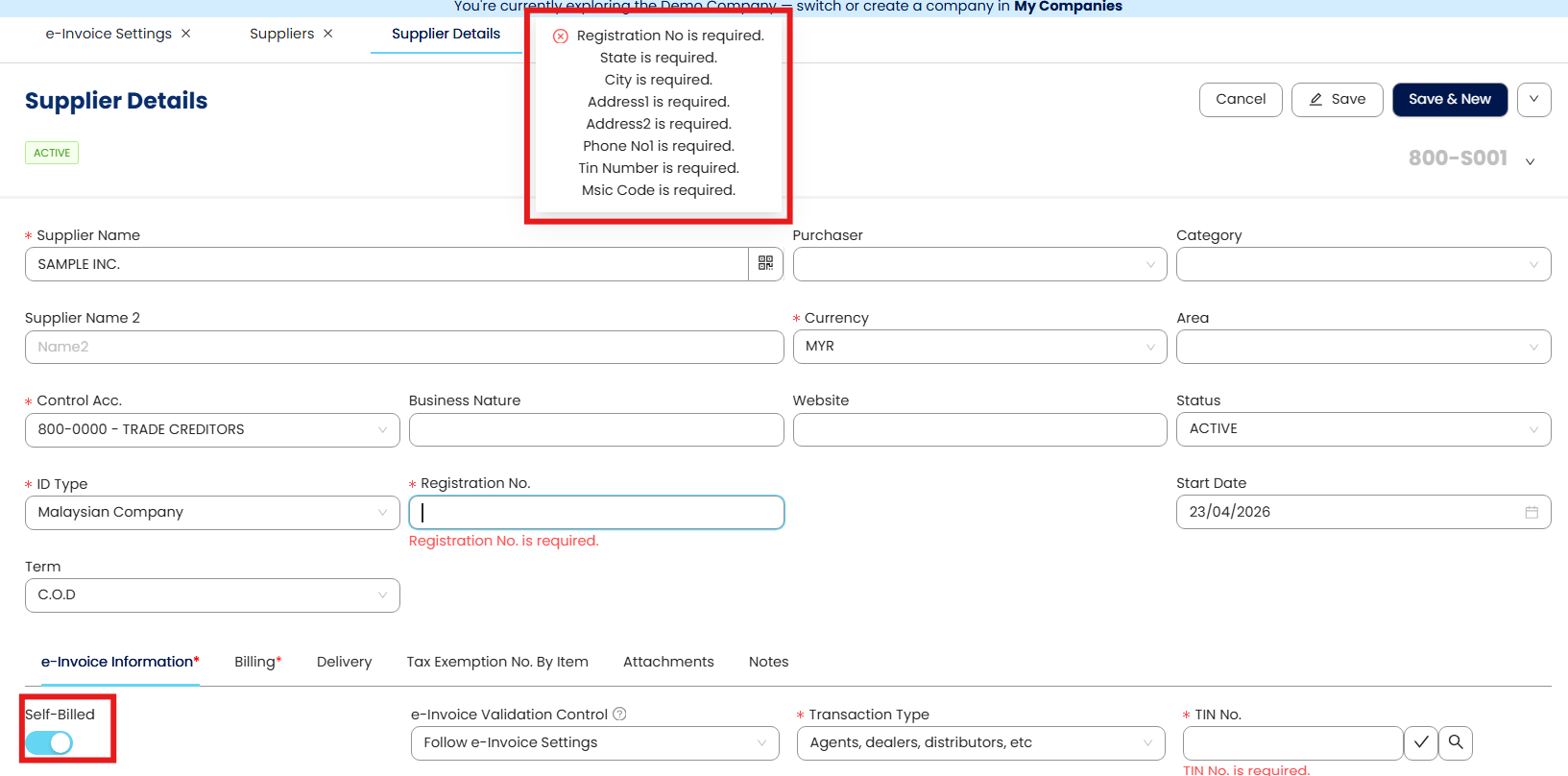
Diagram 2.b.i. shows the error prompt when you’re trying to create a new supplier in your database, whereby the self-billed option is toggle as open. The system will prevent you from saving the supplier creation if all relevant fields are yet to be filled in.
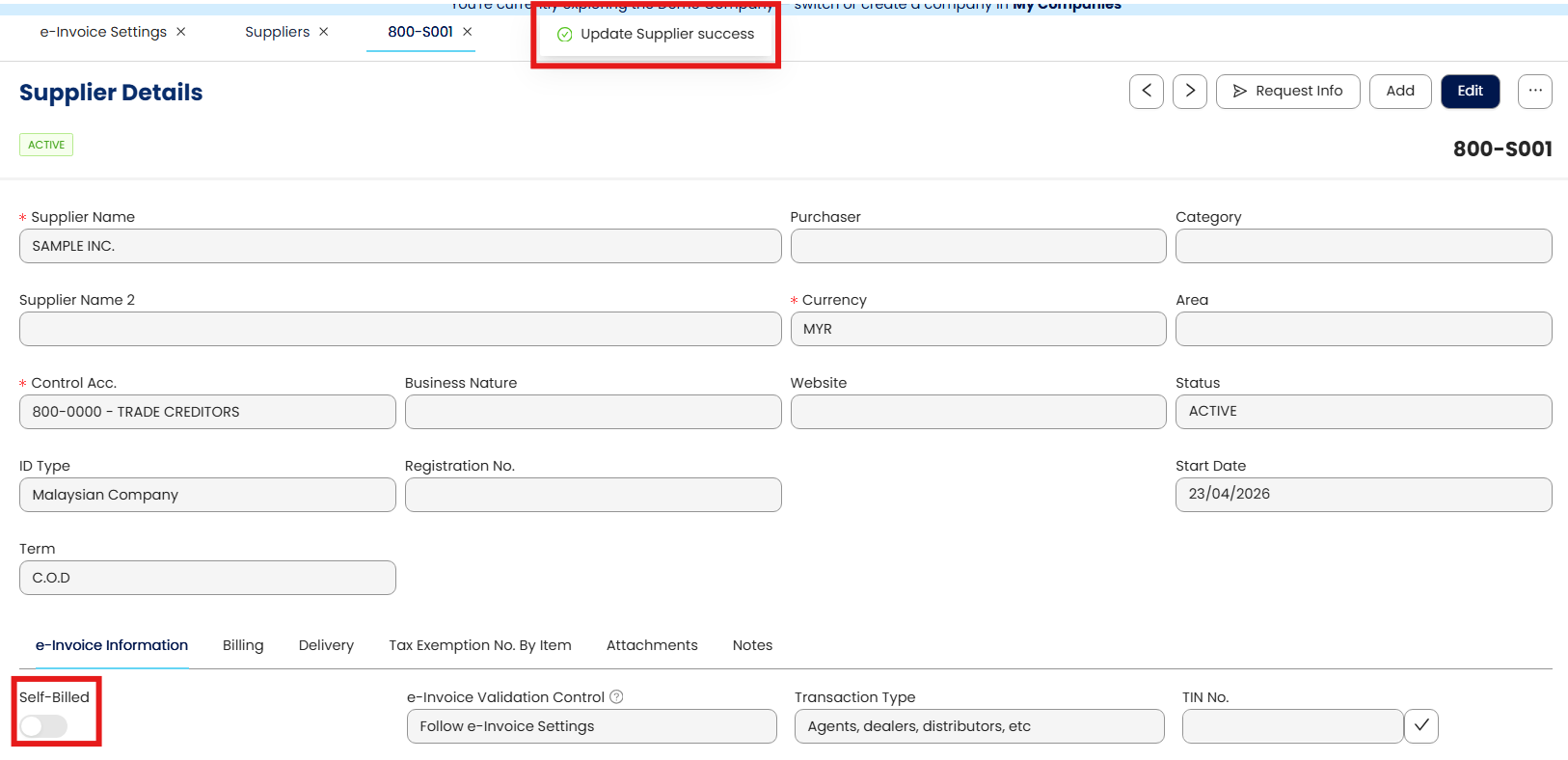
Diagram 2.b.ii. shows the supplier update is a success when you’re creating a new supplier in your database with the self-billed option to toggle as close. The system allows you to save the supplier creation even when all relevant fields are left as empty.
Stock & Services Item Maintenance - Ensures that product/service master records used on e-Invoices include valid description and classification information.

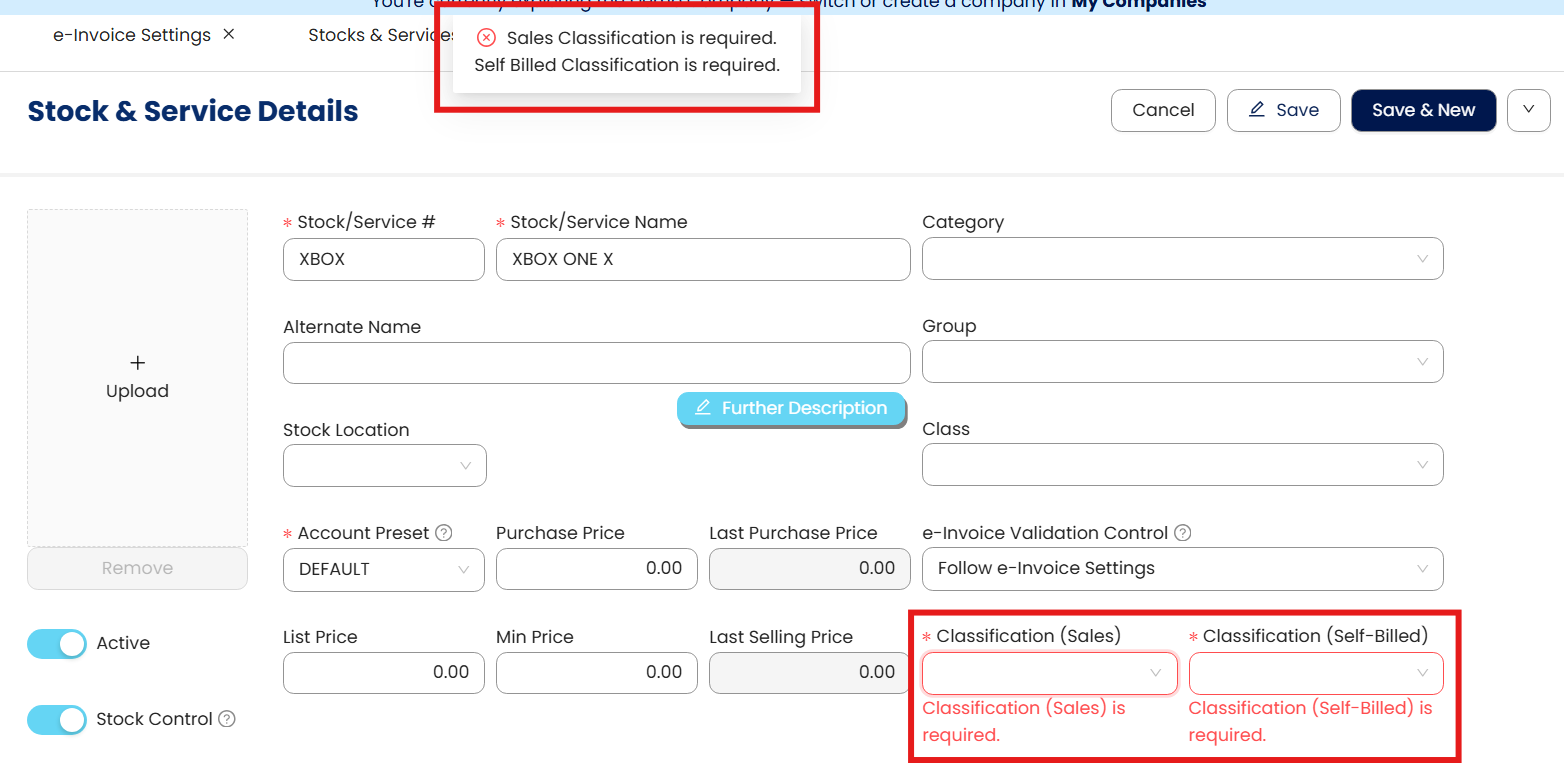
Diagram 2.c. shows the error prompt when you’re trying to create a new stock & services details in your database. The system will prevent you from saving the stock and/or services creation if all relevant fields are yet to be filled in.
Click Save Changes so the screen validation can take into effect.
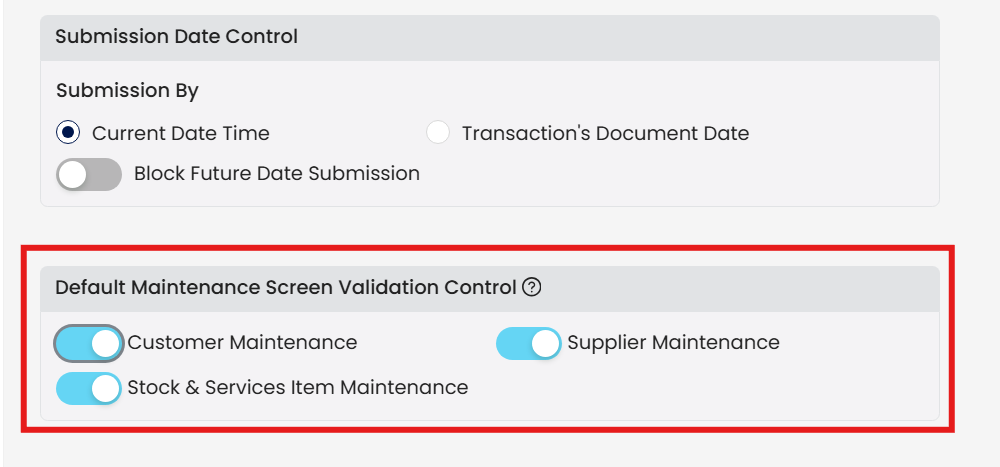
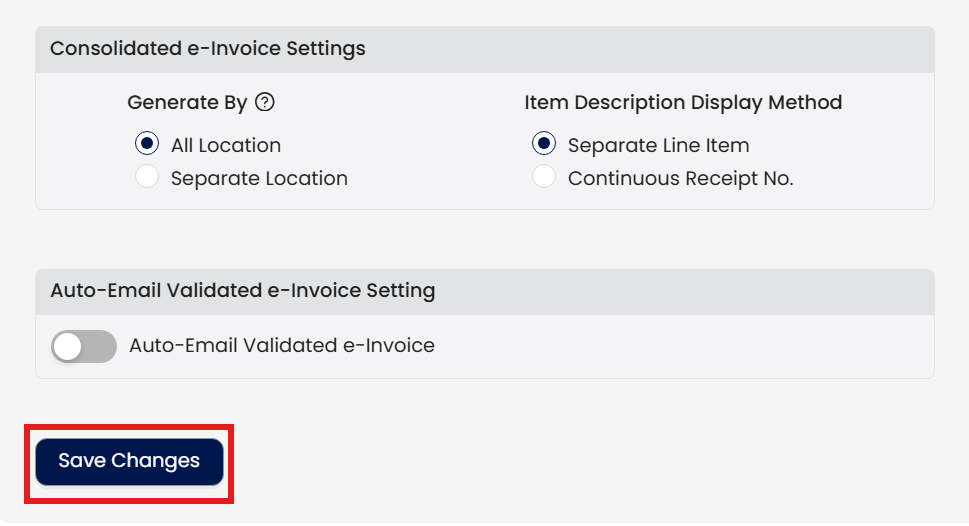
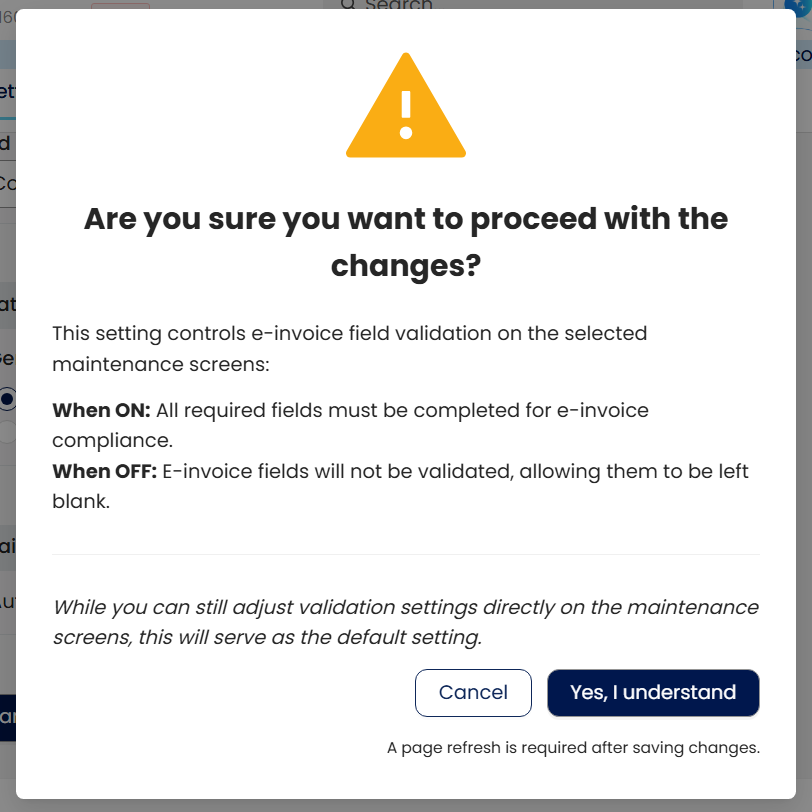
Click “Yes, I understand” for the prompted pop-up. Upon clicking, the page will refresh on its own and the changes will take effect accordingly.
Why This Matters: Real-World Compliance Insights
Mandatory Data for e-Invoices
Malaysia’s e-Invoice system (via LHDNM’s MyInvois API) requires structured data fields, such as:
Buyer and Seller TINs
Itemised product/service details (including MSIC classifications)
Invoice date and number
Missing or incorrectly formatted data can lead to rejected submissions. By enforcing validation at master-data entry, your organization reduces the likelihood of e-Invoice rejections due to data errors.
Increased Validation Strictness from LHDNM
Recent updates to the e-Invoice validation rules include stricter checks on field formats and lengths — including dates in valid format, string limits on invoice numbers, payment terms, and business classification codes — meaning that data must be accurate and conform to LHDNM standards.
For example:
Invoice date fields must adhere to valid formats.
Code fields (like MSIC) must follow specific numeric patterns.
Text fields such as business activity descriptions must meet length and content criteria.
Ensuring proper master data through QNE’s validation control avoids late discovery of these issues at the engine submission stage.
Avoiding Rejection and Compliance Penalties
Incomplete or poorly structured e-Invoices not only fail validation — they can expose your business to penalties under Malaysian tax law if not promptly corrected.
Implementing validation at the maintenance stage helps:
Reduce validation errors during submission
Improve operational efficiency
Support legal and regulatory compliance
Application: Real-World Examples
Ensuring Accurate Buyer Details
A customer’s TIN is missing in the QNE database. Because LHDNM requires accurate Buyer TINs in e-Invoice data, enabling Customer Maintenance validation in QNE prompts users to enter the TIN upfront, avoiding downstream rejection from the MyInvois submission service.
Enforcing MSIC and Product Details
MSIC codes must reflect correct business classifications for goods and services (as required by e-Invoice guidelines). Enabling Stock & Services Item validation ensures your items include valid MSIC codes — helping achieve compliance for itemized lines in e-Invoices.
Preventing Supplier Record Errors
Supplier records lacking proper business activity descriptions or TINs can cause complications during e-Invoice generation. By toggling Supplier Maintenance validation, you enforce minimum data completeness at the source, reducing correction loops later.
Frequently-Asked Questions (FAQs)
Why can’t I save a customer / supplier / item in QNE?
ANS: Because Default Maintenance Screen Validation Control is enabled, QNE enforces completion of mandatory e-Invoice fields at master data stage, not during invoice submission
Why does supplier validation only apply to self-billed suppliers?
ANS: Supplier Maintenance validation only triggers when Self-Billed is toggled ON.
For non-self-billed suppliers, validation is intentionally bypassed to avoid unnecessary blocking
My e-Invoice keeps getting rejected by LHDNM. How do I prevent this?
ANS: Enable validation at the maintenance stage so missing or incorrectly formatted data (TIN, MSIC, descriptions) is caught before submission, not at MyInvois API level
Can I still save records without filling everything?
ANS: Yes — only if validation is OFF, or in the case of non-self-billed suppliers.
Once validation is ON, saving is blocked until required fields are completed
Is this validation required by law or just QNE?
ANS: The validation logic aligns with LHDNM e-Invoice requirements, not arbitrary system rules.
Missing or invalid data can expose businesses to penalties if not corrected promptly
When should I turn this validation ON?
ANS: You may turn on this validation:
When preparing for full e-Invoice rollout
When finance teams repeatedly face submission errors
When data quality across customers/items/suppliers is inconsistent
System Scope: QNE AI Cloud Accounting / N3 AI Accounting
Was this article helpful?
That’s Great!
Thank you for your feedback
Sorry! We couldn't be helpful
Thank you for your feedback
Feedback sent
We appreciate your effort and will try to fix the article
