Overview:
By enabling the Customer and Supplier Request Tax Info setting, customers can submit their company tax information later using any email address, not just the email captured in the customer maintenance. This allows finance or admin teams to complete e-Invoice details even if the original buyer does not have the correct information on hand.
At the point of purchase, customers may not have their full company or tax details available. Instead of blocking the transaction or issuing an incomplete document, this setting allows businesses to collect an email address first and request the required tax information later — with no restriction on which email can be used to submit the details.
Scenario:
You operate an F&B business. A staff member from N3 AI Accounting (formerly QNE AI Cloud Accounting), Mr. Roy is a regular customer that always comes to your place for lunch/dinner appointments and holds events at your restaurant. Before e-Invoice, you often issued hand-written receipts to him.
Today, Roy has another business appointment at your restaurant. At the point of purchase, Roy does not have his company details available. The cashier informs him that this is not an issue and requests his email address instead. Roy provides his email address (e.g. roy@qne.com)
You will need to ensure the relevant settings are enabled to capture customer details for e-Invoice purposes.customer scenario.
Steps
Create a customer named QNE Software Sdn Bhd.
Select Deferred Validation to allow the transaction to proceed without full tax details at checkout.
Click Save and Select Request Info to generate a secure link for the customer to submit company tax information later.
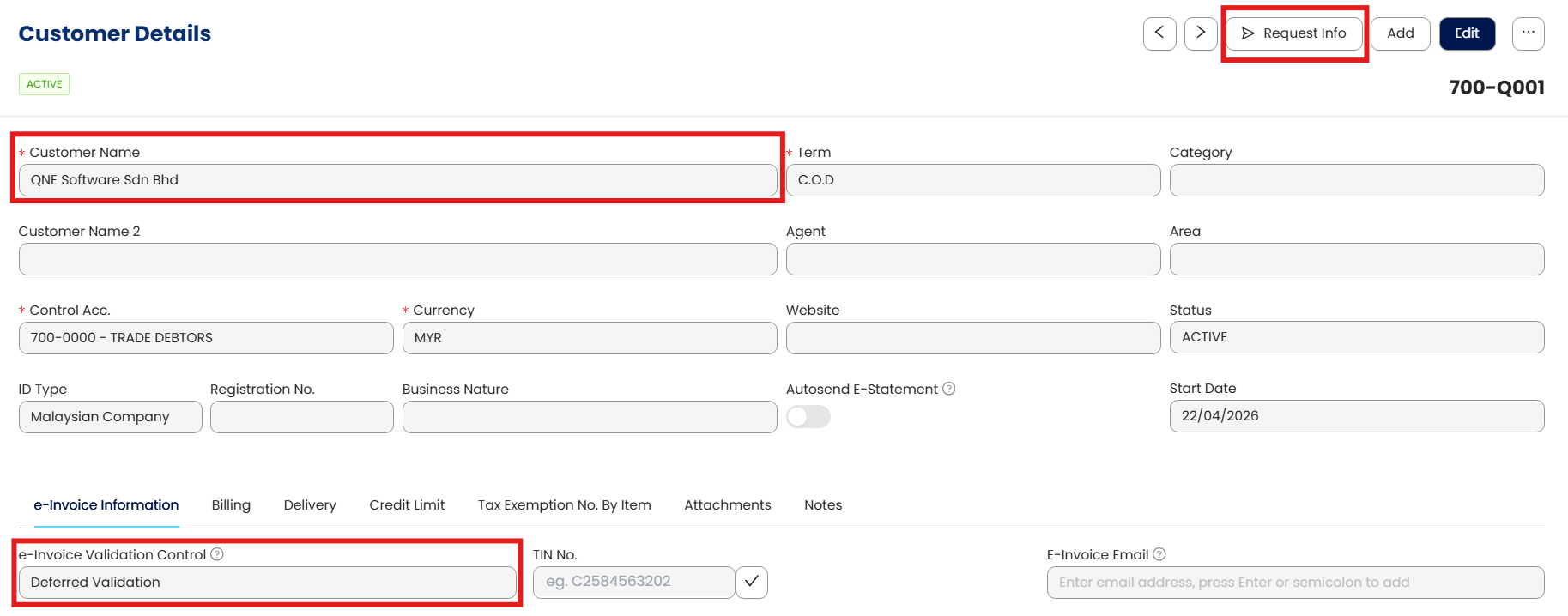
Enter Roy’s email address (roy@qne.com)
Roy will receive a link via email to update the company details.
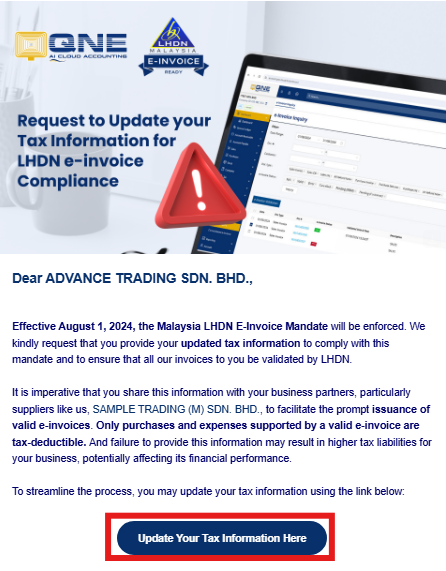
The ideal workflow once Roy returns to the office, he may update the company details himself with the right company tax info.
If Roy himself is not the right person to submit the company tax info, as an alternative, he may request the cashier to Whatsapp the link to him to forward to the finance or admin team to update the information.
In order to do this, on the E-Invoice Settings page, you will have to enable the ‘Customer and Supplier Request Tax Info’ option.”
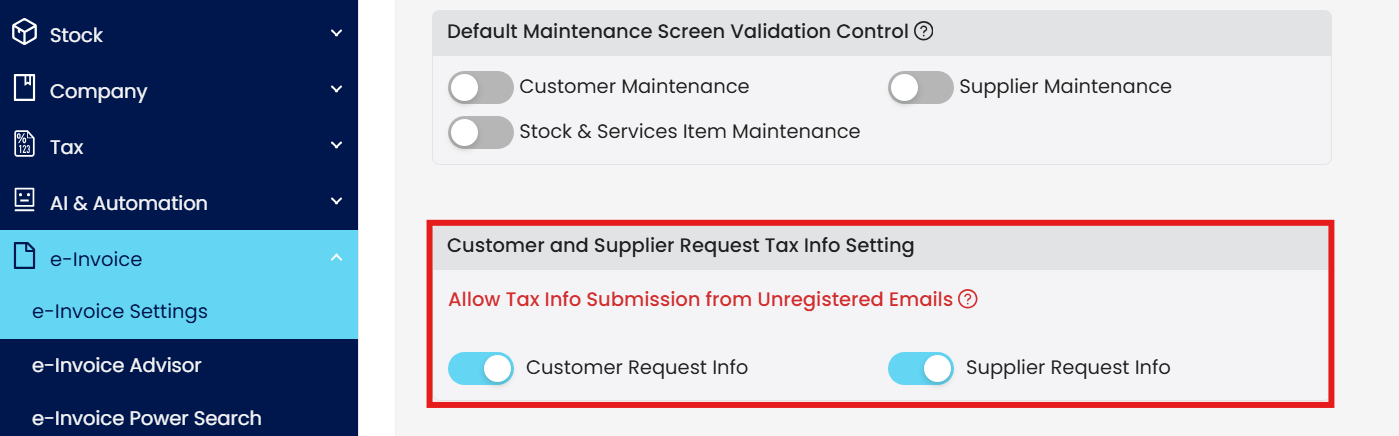
an This is to allow unregistered email (such as Roy’s finance team’s email that Roy cannot recall at the point of purchase) to submit the company’s tax info. With this setting enabled, the tax information does not need to be submitted by Roy himself — anyone he forwards the link to can complete it using their own email address.
Difference Between Turning the Setting ON vs OFF
✅ If the setting is ON
The system will allow anyone Mr Roy forwarded the link to, such as his finance team to input their email in the submission form.
❌ If the setting is OFF
The system allows Mr Roy to key in the company tax info later on, but since the registered email in your customer maintenance is roy@qne.com, Roy is required to submit the company info himself.
Key Takeaway
Keep this setting enabled to allow customers or their finance teams to submit company tax information later using any email address, without delaying checkout or depending on a single contact person. This improves e-Invoice completion rates while keeping control over when data changes are permitted.
Customer & Supplier Request Tax Info Setting — Q&A
Q1: What if a customer doesn’t have their company tax information at the point of purchase?
You can still proceed with the transaction by capturing the customer’s email address first. The required company tax information for e-Invoicing can be requested and completed later via a secure link sent to the customer’s email.
Q2: Do customers need to provide full company details before payment?
No. With Deferred Validation enabled, full company and tax details are not required at checkout. This prevents delays at the counter while still allowing proper e-Invoice submission later.
Q3: How does the Customer & Supplier Request Tax Info feature work?
After the transaction is saved using Deferred Validation, the system sends a secure link to the provided email address. This link allows the recipient to submit or update the company’s tax information required for e-Invoicing.
Q4: Can the company tax information be submitted using any email address?
Yes — if the Customer and Supplier Request Tax Info setting is enabled, the tax information can be submitted using any email address, not just the email captured in the customer maintenance. This means the link can be forwarded to a finance or admin team member to complete the details.
Q5: What happens if the original customer is not the right person to submit tax details?
The customer can forward the submission link (for example via WhatsApp or email) to their finance or admin team. That person can then submit the company tax information using their own email address, as long as the setting allows unrestricted email input.
Q6: What happens if the “Customer and Supplier Request Tax Info” setting is OFF?
If the setting is OFF, the system restricts submission to the original email address captured in the customer record. The tax information must be submitted by that person, even if they are not the appropriate contact.
Q7: Why should businesses enable this setting?
Enabling this setting provides flexibility without disrupting operations:
No checkout delays when customers forget details
Finance or admin teams can submit accurate tax info later
Reduced dependency on a single contact person
Higher e-Invoice completion success rate
Q8: Does allowing any email compromise data control or security?
No. The business still controls whether tax information updates are allowed. The setting only determines who is allowed to submit the information, not whether changes are automatically accepted without validation.
This setting allows customers or their finance teams to submit company tax information later using any email address, even if the details were not available at the point of purchase.
System Scope: QNE AI Cloud Accounting / N3 AI Accounting
Was this article helpful?
That’s Great!
Thank you for your feedback
Sorry! We couldn't be helpful
Thank you for your feedback
Feedback sent
We appreciate your effort and will try to fix the article
